Friday, September 28, 2012

PC Optimizer Pro

PC Optimizer Pro is a comprehensive software application which, apart from protecting your privacy and managing your system startup, combats a variety of PC-envy factors. PC Optimizer Pro is multilingual, multi-utility software suit having the following basic features: 
  • Universal Fixer for managing all aspects of your PC’s performance and speed.
  • Hybrid optimization technology for advanced registry care and repair.
  • Built-in, intelligent Startup Manager to help you jump start your PC.
  • File Shredder to delete sensitive files permanently, with no chance of recovery by any existing technology.
  • Internet Junk cleaner to optimize and speed up your browser by cleaning junk, cache and cookies.

PC Optimizer Pro Features


Universal Fixer
The Universal Fixer feature of PC Optimizer Pro lets you clean up invalid entries, junk files and internet junk which may affect your PC's performance and activity. Thus, it improves your PC's effectiveness and strength. It is a vital tool if you don't want costly hardware upgrades.
File Shredder
File Shredder function does the job of permanently removing files from your disk thereby dispelling the fears of them being ever recovered (a vital function because even when you trash files or reformat your hard drive, data can still be recovered and can be misused).
Program Uninstaller
Program Uninstaller uninstalls useless programs present in your PC, making your PC simpler and friendlier for you.
Manage Startup
Manage Startup is a type of software utility which brushes up your PC's start-up so that you may have a speedier PC. It allows you to control, configure and review your programs that start when you power up your system or logon to Windows.
System Info
System Info gives useful pieces of information regarding your system's configuration.
Windows Tools
Windows Tools is an umbrella utility of PC Optimizer Pro that gives a user multiple ways to manage different sorts of Windows related functions of their PC.
Restore Backup
With Restore Backup , you can reverse the action of registry cleaning performed by you the last time

Download
Click image to download

Thursday, September 27, 2012

Deep Freeze Standard Version 7.51.020.4170 (September 2012)


Faronics Deep Freeze has the power to make your PC indestructible. It changes the way IT Professionals and home users protect small environments by providing the ultimate computer protection that will keep your PC running like new for years to come. Here’s how it works. Once your PC is configured the way you want it, simply Freeze it. Then watch it work. Any accidental changes that leave you scratching your head in wonder are all erased with one easy reboot.

It’s a simple, robust, and cost effective solution for environments with up to five workstations that don’t require central control. Because Deep Freeze ensures 100% workstation recovery with every restart, you can enjoy total availability and better security all in one convenient solution.

Whether you’re concerned about malware, security, or making sure your machine is working properly, Deep Freeze is the answer. Any malware attacks will be removed when you restart your machine too! You can forget about spending hours troubleshooting your computer, calling in favors from friends, or paying expensive IT professionals. With Deep Freeze, you can solve your own problems in minutes by restarting your computer. It’s really that simple.

Features:
  • Retain data across reboots by using the complementary Faronics Data Igloo, that allows you to redirect user profiles, folders, and registry keys to a Thawed drive.
  • Easy deployment is available with two deployment options. Faronics Deep Freeze can be deployed as part of your imaging solution or you can deploy it as a silent install natively.
  • Eliminate troubleshooting with a simple restart, ensuring 100% availability. Whether you’ve downloaded something corrupt, visited a poisoned site, or made some other type of accidental change, there’s no need to worry. With Deep Freeze installed, when things go awry, simply reboot the machine and it will be returned to its desired configuration.
  • Enhance your security with a solution that makes your computer immune to common problems like malware and accidental changes. In addition to securing your operating system, Deep Freeze also protects the master boot record from rootkit injections, making your security truly bulletproof.
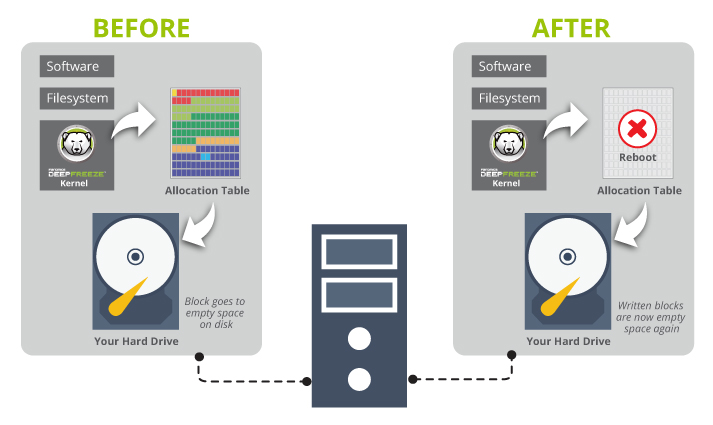
How  it works:
It’s easy to say just how easy Deep Freeze can make your life, but you’re probably asking how exactly it will do that. It’s simple, just like this!


Deep Freeze Standard Release Notes

Version 7.51.020.4170 (September 2012)

Fixes
5471 – Resolved issues related to insufficient space on system drives when installing Deep Freeze. (Case No: YBK-318-94672)

Known Issues
4826 – Deep Freeze icon is not displayed when Deep Freeze is in a remote session. (Case No: JKH-309-50932)

Download:
Click image to download

Wednesday, September 26, 2012

Hide Folders 2012


Hide Folders 2012 - Hide, lock and password protect your private files and folders from other users.
Hide Folders is an innovative software application which enables you to password protect all the private information on your hard drive. You can swiftly make your files and folders inaccessible, invisible or protect them from modification or removal. The protected folders or files are not accessible by users - no matter how they are trying to get in - locally or from the net. Effective protection mechanism, intuitive user interface, and set of fine-tuning options will suit the needs of everyone from novice Windows users to computer experts. Since 2001, our Hide Folder software products help our users to hide private files and folders from prying eyes.

No better way to protect a folder or a file as easy as Hide Folder does!

With Hide Folders you can easily protect any number of folders and files on your computer. You can select any file or folder to protect from the program, drag-and-drop the desired files and folders from Windows Explorer into the Hide Folder window or protect the file or folder using Windows Explorer context menu.

Features and benefits

  • Immediate data protection (protect and unprotect commands are execited in no time).
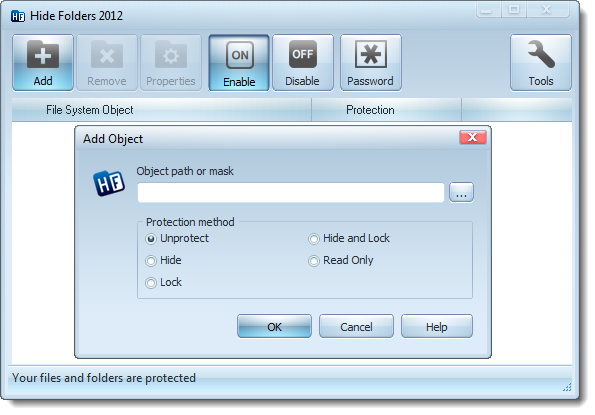
  • 4 protection methods available: Hide, Lock, Hide & Lock, Read Only
  • NTFS, FAT32, exFAT and FAT volumes are supported.
  • File masks (wildcards) support.
  • Unlimited number of folders can be protected at the same time.
  • No limits on the size of protected data.
  • Trusted processes support - processes which are permitted to access the protected data.
  • No file system structure modifications will occur.
  • Password protection to prevent unauthorized users from accessing your private data.
  • Protected uniinstall.
  • Removing Hide Folders application folder from the system will not uncover hidden folders.
  • Files from hidden folders will not be lost even if someone tries to remove an upper-level folder.
  • Different wipe tracks options.
  • Crutical folders aware - Hide Folders prevent locking system folders for stability reasons.
  • Safe mode support - The folders can be hidden even if your computer is running in safe mode.
  • Hot keys to manage basic Hide Folders functions.
  • Command line support of all main Hide Folders functions.
  • Support of folders named with national language symbols .
  • Multilingual support, its user interface supports different languages and can be easily translated to new languages.
  • Intuitive and extremely easy-to-use user interface with skins.

Difference from internal Windows data protection features

A lot of advanced users believe that our hide folder software (as well as any other third party folder protection software) is useless because Windows has integrated file and folder lock features.
Well, indeed, you can lock folders with Windows and this folder will be inaccessible by the other (unauthorized) users. But there are some annoying limitations that you should be aware of:
  1. Windows allows you to lock files and folders on NTFS volumes only. FAT volumes are not supported.
  2. It is impossible to hide folder or file with standard Windows facilities. Only file and folder lock is possible.
  3. There is no way to make folder invisible but accessible which is helpful for different security tasks like logging, private data recording, backing up etc.
  4. A system administrator can easily get access to the locked folders and files.
  5. Some Windows home editions don't have user interface to protect files and folders.
  6. Windows does not allow setting password for protected data. It authenticates users at logon. So if you share your account with the nother users, then you can't exploit Windows folder protection features.
  7. It takes some time and user qualification to manage access control in Windows.

Protection modes: Hide folder, Lock folder, Hide & Lock folder, Read Only

Hide — When you enable protection, the protected file or folder will not be visible to a user, but it will be possible to access it if you know the path to the object. This may be helpful when you want to hide application folders but allow to run the applications from these folders. E.g. you may hide Hide Folders application folder so nobody will know about it, but if you type from the command prompt "C:\Program Files\Hide Folders 2012\hf.exe", Hide Folders 2012 will run.
Lock — the protected file or folder will be visible but not accessible. It is similar to built-in protection of Windows NT-based operating systems on NTFS volumes. You can not use this protection method for critical folders, like Windows, Windows\System32, C:\, Hide Folders application folder...
Hide & Lock — The protected file or folder will not be visible to a user and it will not be possible to access them. This protection mode unites Hide and Lock.
Read only — You can access the protected files and folders, but you cannot modify them. If you protect folder contents (using asterisk wildcard), you cannot copy files into the folder.
No protection — If you choose this method, your file or folder will remain unprotected. This method is recommended when you need to unprotect one folder temporarily. If you want to unprotect a folder forever, just remove it from the list.

Trusted processes

You may want some "trusted" applications to have access to the protected data. This may be helpful for antivirus and backup software. Hide Folder lets you set a list of trusted processes that have an unlimited access to the protected files and folders.

Always innovative

Every version of Hide Folders software works better then the previous one. The first version of Hide Folders was released back in the beginning of 2001 and we permanently adding new features and made it more safe and reliable all this time.
Download free trial version:
Click image to download

Tuesday, September 25, 2012

Total Uninstall Professional 6.2.1


Total Uninstall - powerful installation monitor and advanced uninstaller
Total Uninstall is a complete uninstaller which includes two working modes.

Installed Programs module analyze existing installations and create a log with installation changes. It can uninstall programs even without the help of the supplied Add Remove program.
Just select from the list the program that you want to uninstall and in a few seconds Total Uninstall will analyze it and will show in a tree view detected files, folders, registry keys and values of that program. You can review the details and remove some of the detected items. Total Uninstall is ready to uninstall the analyzed program. It will use first the supplied Add Remove program and will continue removing remaining items using the log.

Monitored Programs module helps to monitor any changes made to your system during the installation of a new program. It allows you to perform a complete uninstall without having to rely on the supplied Add Remove program, which can leave files or changes behind.
Total Uninstall creates a snapshot of your system prior to installing a new program. It then takes an additional snapshot after the installation has completed. It then compares the two snapshots and displays all changes in a graphical tree view, marking all registry values and/or files that have been added, changed or deleted. Total Uninstall saves these changes and, if you decide to uninstall the program, it will reverse the changes to the previous state.

Features
  • Accurate analyze existing installations and create a log with installation changes.
  • Monitor changes from registry and file system for new installations.
  • Uninstall completely and thoroughly analyzed or monitored programs.
  • Create a backup for a program and restore the program from backup.
  • Organize in groups installed or monitored programs.
  • Find the program to uninstall by keyword quickly and easily.
  • Summary and detailed information for each installed or monitored program.
  • User configurable views of the detected changes.
  • It shows a detailed uninstall log.
  • Powerful search in detected changes.
  • Standalone program agent for notification of running installation programs.
  • Export registry changes for install or uninstall.
  • Export installed or monitored programs list to file.
  • Export to file or print detected changes.

How to install

Total Uninstall - Installation monitor benefits

  • Ensure you can remove programs that refuse to uninstall
  • Keep your computer clean from any uninstall remnants
  • Find out what programs have been doing on your computer

1. Start the monitoring process

 Before a program will be installed create a system snapshot with one click


2. Install the program as usual

The installation can be started from Total Uninstall interface but is not required. The name of the installed program will be detected automatically. After installation just ran the installed program once and close it. Then continue with the next step.

3. Finish the monitoring process

One additional click on the "Program is installed" button to finish the process.


The result

Detailed changes about monitored installation easy to explore, search, modify or uninstall.


       Download trail version :
The uninstaller is compatible with 32-bit and 64-bit operating systems
Windows 8, Windows 7, Windows Vista, Windows XP, Windows Server 2008, Windows Server 2003
Click image to download


Your Uninstaller! Pro 7.4.2012.05


Overview
You've probably encountered some stubborn programs that just won't uninstall at all or uninstall completely, right? And, more often than not, when you use the Windows Add/Remove Program utility, there are remnants or "artifacts" of the program left behind in the system registry and on your hard drive that are no longer needed. These useless items will bog your PC down and, over time, it will get slower and slower lugging around this useless baggage - unexpected errors and frequent crashes may also occur because of this!
What's the problem?
Let's say you frequently install trial versions of programs to check them out. And let's also say that, after giving them a shot, you don't like them and decide to uninstall them. Unfortunately, you find it impossible to uninstall some of them - they remain on the Windows installed programs list even they are "supposedly" gone. These improperly uninstalled programs can also be the cause of errors because many junk files and registry keys/values were left behind on your PC. These 'junk artifacts' can - and do - cause system problems and slow down Windows substantially.

Here's the solution!
Your Uninstaller! will solve these problems. It removes any installed program and clears all the left-behind traces - no more 'junk artifacts' remaining. Whenever you uninstall a program, Your Uninstaller! removes it completely! There's absolutely nothing left behind.
"PCs inevitably accrue a mass of unwanted and unused files that eat up system resources and reduce system stability. Uninstalling these items can be an arduous task, but Your Uninstaller Pro simplifies the process considerably..." - CNET Review

Key benefits
  • Uninstall any installed program completely, even corrupted ones.
The most exciting part of Your Uninstaller! is: removing every part of a program completely. With Your Uninstaller!, it's easy to uninstall any installed program - no trace left.
  • Fix invalid uninstalls in one click.
If you often install/uninstall software, you will most inevitably experience corrupted programs. Let Your Uninstaller! fix them.
  • Full system scan after a program is uninstalled for complete removal.
Your Uninstaller! scans the whole system for related traces and completely removes any 'junk artifacts' after normal uninstallation. You'd never even know the program was once installed on your PC.
  • Force removal of a program.
Some programs are really hard to remove, especially old-fashioned non-conforming programs. Even they aren't a problem for Your Uninstaller!
  • Keep your system stable and clean with various system tools.
Your Uninstaller! has built-in system tools like Uninstaller, Startup Manager, Internet Traces Eraser, StartMenu Manager, and Disk Cleaner to keep Windows clean and in proper operating order.
  • Easy to Use. No expert knowledge required.
Usability is always foremost on our minds when we develop products. Your Uninstaller! is simple and straightforward to use. No hassles, no confusion.
  • Windows Vista and Windows 7 Compatible.
Your Uninstaller! is Vista and Windows 7 Compatible for both 32-bit and 64-bit versions. Of course, it also works for Windows XP perfectly.


Changes in 7.4.2012.05:
• Excluded some unnecessary registry keys from scanning process to make scanning a bit faster.
• Fixed some display error on Uninstall Wizard.
• Other minor changes and bug fixes.

Download trail version: 
Click image to download

TeraCopy 2.27


TeraCopy is designed to copy and move files at the maximum possible speed. It skips bad files during the copying process, and then displays them at the end of the transfer so that you can see which ones need attention. TeraCopy can automatically check the copied files for errors by calculating their CRC checksum values. It also provides a lot more information about the files being copied than its Windows counterpart. TeraCopy integrates with Windows Explorer's right-click menu and can be set as the default copy handler.


Features
  • Copy files faster
        TeraCopy uses dynamically adjusted buffers to reduce the seek times. Asynchronous copying speeds up the file transfer between two physical hard drives.
  • Pause and resume file transfer activities
        Pause the copy process at any time in order to free up system resources and continue with a single click.
  • Error recovery
       In case of a copy error, TeraCopy will try several times to recover and, in the worse case scenario, will simply skip the file, not terminating the entire transfer.
  • Interactive file list
        TeraCopy shows the failed file transfers and lets you fix the problem and recopy only the problem files.
Shell integrationTeraCopy can completely replace the Explorer copy and move functions, in turn enabling you to work with files as usual.
  • Full Unicode support.
  • Windows 8 x64 support.
Click to download 
Another link
   

VMware Workstation 9.0.0 Build 812388


VMware Workstation 9.0.0 Build 812388 
VMware Workstation known program for virtualization. VMware Workstation is a powerful solution for software developers and system administrators who are creating and testing fully integrated network applications server class operating in different environments.The unique technology of VMware MultipleWorlds isolates operating systems and applications within virtual machines, and the disposal of each virtual machine is a standard PC x86, with its own processor and memory. With this solution you can on a single computer to conduct processes of development, testing, debugging and running multi tier browser based applications that exploit the new operating systems and legacy applications on one computer, install new or upgrade existing operating systems without performing partitioning operations and restart the computer.

Features
  • Access Anytime, Anywhere
        VMware Workstation provides a seamless way to access all of the virtual machines you need, regardless of where they are running. Remotely connect to virtual machines running on VMware vSphere, ESXi or another copy of VMware Workstation. Workstation’s web interface lets you access local and server hosted virtual machines from your PC, smart phone, tablet or any device with a modern browser.
  • Run a Cloud on Your PC 
        Workstation enables you to build a cloud on your laptop. You can run VMware’s Micro Cloud Foundry and other cloud infrastructures such as Apache’s OpenStack. You can also run Big Data applications from companies like Cloudera including the Apache™ Hadoop™ software library.
  • Take Your Productivity to the Next Level
         Run applications on multiple operating systems including Linux, Windows and more at the same time on the same PC without rebooting. Evaluate and test new operating systems, applications and patches in an isolated environment. Demonstrate complex software applications on a single laptop in a repeatable, reliable manner. Rich integration with Visual Studio, Eclipse and the SpringSource Tool Suite make it incredibly easy to test applications on multiple platforms. Simply drag and drop virtual machines to move them between your PC and VMware vSphere.
  • Run Your Most Demanding Applications
        VMware Workstation takes advantage of the latest hardware to replicate server and desktop environments. Create virtual machines with up to 8 virtual processors or 8 virtual cores, 2 TB virtual disks and up to 64 GB of memory per virtual machine to run the most demanding applications. In addition, Workstation has support for HD audio with 7.1 surround sound, SuperSpeed USB (USB 3.0) and Bluetooth.

And for those times when you need it, virtual processors that support Intel VT-x or AMD-V capabilities enable you to run 64-bit virtual machines within VMware vSphere or Microsoft Hyper-V Server running in a Workstation virtual machine. Workstation 9 introduces virtual performance counters that allow developers to use profiling tools such as Intel’s VTune to analyze the performance of software running inside the Virtual machine.
  • Share the Benefits by Sharing Virtual Machines
        Sharing a virtual machine is the quickest way to share and test applications with your team in a more production-like environment. Run VMware Workstation as a server to share virtual machines with your teammates, department or organization. VMware Workstation provides enterprise caliber control over user access.
  • The Best 3D Graphics
         VMware Workstation was the first to support 3D graphics in virtualized environments including the Microsoft Windows Aero user interface. Run even more 3D applications with support for DirectX 9.0c Shader Model 3 and OpenGL 2.1 3D graphics in Windows and Linux virtual machines.

Workstation 9 includes support for the new Windows Metro interface, significant performance and rendering improvements to better support professional graphical applications such as AutoCAD and Solidworks, Anti-Aliasing, OpenGL 2.1 for Linux operating systems and even an improved graphics driver for Windows XP.

And more you can find in here


What’s New Version in Workstation?

  • Best in Class Windows 8 Support
  • Access from Almost any Device
  • Set It and Send It
  • From PC to Datacenter and Back Again
  • Better 3D Graphics
Download trail version :
Click image to download

Monday, September 24, 2012

CCleaner 3.22.1800


CCleaner (formerly Crap Cleaner), developed by Piriform, is a utility program used to clean potentially unwanted files and invalid Windows Registry entries from a computer. A public version 1.01 for the Mac OS X has been released  along with a Network Edition

Features
CCleaner is our system optimization, privacy and cleaning tool. It removes unused files from your system - allowing Windows to run faster and freeing up valuable hard disk space. It also cleans traces of your online activities such as your Internet history. Additionally it contains a fully featured registry cleaner. But the best part is that it's fast (normally taking less than a second to run) and contains NO Spyware or Adware!
Cleans the following:

  Internet Explorer
          Temporary files, history, cookies, super cookies, Autocomplete form history, index.dat files.

   Firefox
           Temporary files, history, cookies, super cookies, download history, form history.

   Google Chrome
           Temporary files, history, cookies, super cookies, download history, form history.

    Opera 
            Temporary files, history, cookies, super cookies, download history.

    Safari
            Temporary files, history, cookies, super cookies, form history.

    Other Supported Browsers
            K-Meleon, Rockmelt, Flock, Google Chrome Canary, Chromium, SeaMonkey, Chrome Plus,             SRWare Iron, Pale Moon, Phoenix, Netscape Navigator, Avant and Maxthon.         

    Windows
            Recycle Bin, Recent Documents, Temporary files, Log files, Clipboard, DNS Cache, Error                 Reporting, Memory Dumps, Jump Lists.

    Registry Cleaner
            Advanced features to remove unused and old entries, including File Extensions, ActiveX                     Controls, ClassIDs, ProgIDs, Uninstallers, Shared DLLs, Fonts, Help Files, Application                     Paths, Icons, Invalid Shortcuts and more...

     Third-party applications
              Removes temp files and recent file lists (MRUs) from many apps including Windows Media                 Player, eMule, Google Toolbar, Microsoft Office, Nero, Adobe Acrobat, WinRAR, WinAce,                 WinZip and many more...

     100% Spyware FREE
             This software does NOT contain any Spyware, Adware or Viruses.

Download :
Click image to download

TuneUp Utilities 2013 v13.0.2020.14


TuneUp Utilities can make your Windows operating system faster, more comfortable and more secure with just a few mouse clicks. And all operations performed on the operating system are completely safe, because all changes are monitored by TuneUp Rescue Center and can be undone at any time. All TuneUp Utilities modules can be accessed through a common interface that is divided into six categories. The software helps both beginners and experts to make Windows meet their needs in a way that is better, easier and safer. All important system options are explained in an easy way and can be turned on or off at the click of your mouse. TuneUp Utilities will then make the necessary changes in the registry or boot files automatically. We place a high value on system stability, so that Windows won’t stop working reliably. And most changes that you make can be undone in TuneUp Rescue Center – easily and safely.

The TuneUp Turbo Mode provides an immediate performance boost whenever you need it. When you use your computer in the TuneUp Turbo Mode, an analysis is performed to see which tasks, programs and functions are currently running in the background that are not strictly necessary. These programs are stopped or slowed down, allowing the additional processing power gained to be used exclusively by the programs you are actually running.

Maintain SystemRegular maintenance increases the stability of your PC, but is complicated and takes a lot of time when doing it manually. Spare yourself the stress! With TuneUp Utilities, you can clean up your computer and delete unnecessary files with only one click. Neat!
• 1-Click Maintenance and Automatic Maintenance
• Optimize system startup and shutdown
• Defragment hard disks
• Remove broken shortcuts
• Defragment registry
• Clean registry

Increase performanceWhether you are working or gaming: TuneUp Utilities increases the performance of your PC. Programs that are used rarely or never are tracked down, startup processes are shortened and unwanted garbage files are eliminated. For trouble-free working on your PC.
• Turbo Mode
• Configure Live Optimization
• Free up disk space
• Configure system startup
• Display and uninstall programs

Fix problemsWith only a few clicks, you can fix typical Windows problems as easy as pie — without being a PC expert yourself. TuneUp Utilities finds errors on data carriers and fixes them automatically — about 60 of the most frequent problems under XP™, Vista™, and Windows 7™. TuneUp Utilities can even restore files deleted by accident — quickly, easily, and reliably.
• Fix typical problems
• Restore deleted data
• Check hard drive for errors
• Manage running programs

Customize WindowsGive your Windows a new look with TuneUp Utilities and customize programs and system settings to meet your needs: cool new boot screens, icons, and animations provide that personalized look for your Desktop. You can easily customize the appearance of Windows and settings of many programs to your liking.
• Personalize Windows appearance
• Change Windows settings


TuneUp Utilities 2013. What’s new

Our premium tuning features set standards when it comes to removing browser traces and other computer residue. The brand-new TuneUp Utilities 2013 now cleans some 150 popular PC programs, 28 Windows® functions and 25 browsers – a record for this product, made possible thanks to our intensive research. Other new highlights: With the newly developed Live Optimization 2.0 feature, TuneUp recognises and helps stop the most resource-hungry applications on your PC, laptop or tablet
  • NEW! TuneUp Disk Cleaner 2013: the professional cleaner for your PC
  • NEW! TuneUp Browser Cleaner 2013: erases browser traces reliably
  • MORE POWERFUL! TuneUp Registry Cleaner and TuneUp Shortcut Cleaner
  • Other key innovations
Supported OS: Windows XP, Windows Vista, Windows 7, Windows 8

Download
Click image to download